This guide shows two ways to add the ETCPOWv2 token to MetaMask:
the manual method (inside MetaMask) and the one-click method (via a button on this page).
Security warning: Always verify the token contract address before importing.
Scammers often create look-alike tokens with similar names and icons.
Tip: In the manual flow, MetaMask typically auto-fills Symbol and Decimals after you paste the address.
If it doesn’t, verify the token’s details using a trusted explorer for the Ethereum Classic network.
2) Before you start
Important: ETCPOWv2 is on Ethereum Classic, not Ethereum Mainnet.
In MetaMask, make sure you’re using the correct network when interacting with the token.
Install MetaMask (Browser Extension or Mobile App).
Make sure MetaMask has the Ethereum Classic network available (if not, add it in MetaMask’s network settings).
Keep your wallet seed phrase private. Never paste it into websites or forms.
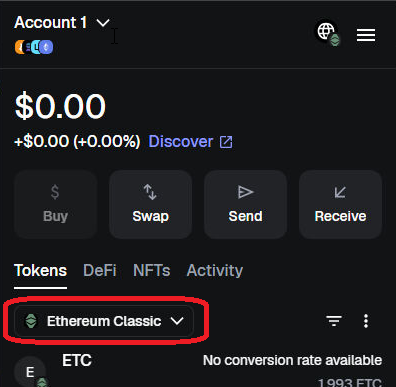
MetaMask: Switch to the Ethereum Classic network (click to open full size).
3) Manual method (Import Token in MetaMask)
This method works everywhere and does not require any special buttons.
You simply import the token in MetaMask by pasting the contract address.
Step-by-step (MetaMask Mobile or Extension)
Open MetaMask and switch to the Ethereum Classic network.
Go to your wallet view and open the Tokens tab.
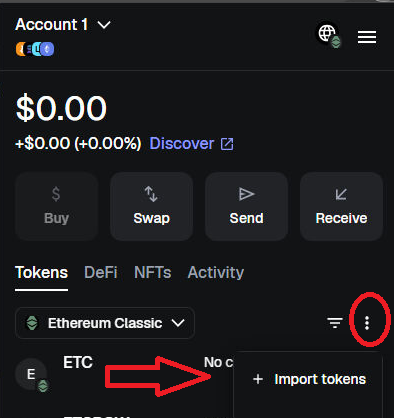
Scroll down and click Import tokens (wording can differ slightly by version).
Select Custom token.
Paste this contract address:
0xDe9016EC50335711F32378d730e9f6096B850479
MetaMask should detect the token details automatically (Symbol and Decimals).
Click Import (or Add Custom Token), then confirm.
MetaMask: Import Token → Custom token → Paste the contract address (click to open full size).
If MetaMask does not auto-fill token details:
Double-check the address and look up the token contract on a trusted Ethereum Classic explorer to confirm the token’s symbol and decimals.
Then enter those values in MetaMask and import again.
4) Easy method (Add via button)
This page can also trigger MetaMask’s “add token” prompt using the Wallet API method
wallet_watchAsset. You still must approve the action in MetaMask.
Compatibility note: The button works only when MetaMask is available in your browser
(MetaMask Extension) or when opening this page inside MetaMask’s in-app browser.
One-click add
What happens next: MetaMask will ask you to connect (if not connected), then show a confirmation popup
to add the token. You can accept or cancel.
.png)